
Dashboard Overview
Welcome to ClawbotPro! The Overview page acts as your primary command center. When you log in, this is the first page you see. Built on a robust, real-time architecture, it is designed to give you a bird’s-eye view of your entire AI workspace, allowing you to monitor agent health, track active sessions, and deploy new agents with a single click.
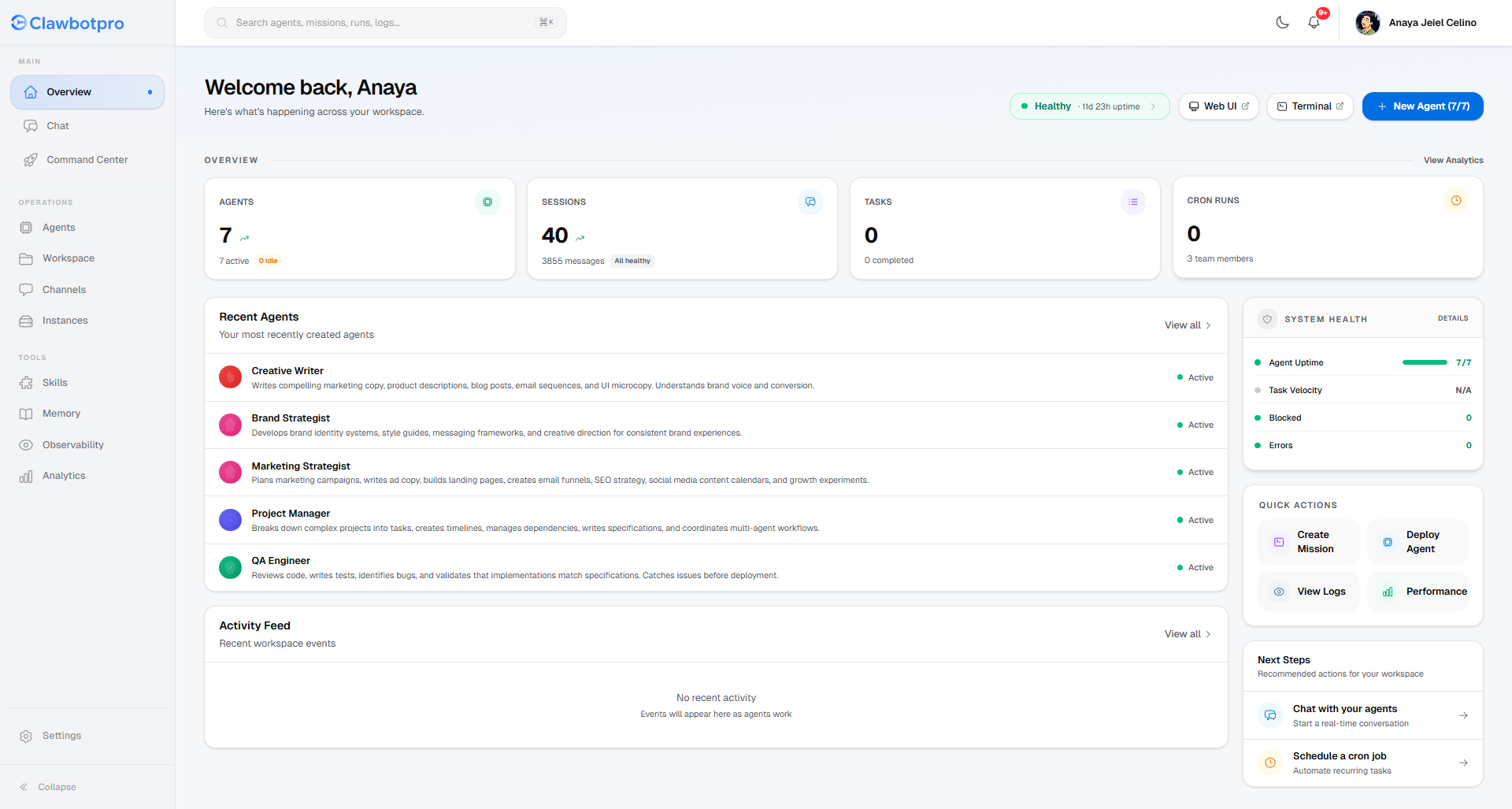
Key Metrics & Status Cards
Four primary metric cards summarize the current state and velocity of your workspace, providing instant visibility into your robotic workforce:
Agents
Shows the total number of AI agents currently provisioned within your subscription limit. Displays active vs. idle.
Sessions
Total active conversation threads or workflows. Tracks volume and flags any sessions experiencing errors.
Tasks
Highlights completed, in progress, or blocked tasks. Contains a visual progress bar of completion rate.
Cron Runs
Tracks recurring operations managed by the Gateway. Monitors operations over the last 24 hours.
Agent Management & Health
The dashboard connects your real-time infrastructure to an accessible user interface. You can access the Recent Agents directory directly below your top-line metrics.
Recent Agents Directory
View recently interacted-with profiles in your workspace. Each entry displays:
- Active (Green) or Paused (Amber) Status
- Custom Agent Avatar & Identity
- Quick jump to specific Agent settings
System Health
Real-time technical oversight tracking your underlying connected node execution:
- Agent Uptime (Responsive vs Offline)
- Task Velocity (% completion)
- Errors & Blocks (Pending Interventions)
Pro Tip: Gateway Action Banner
Pay attention to the top right of the Overview. If you have an active EC2 gateway, the green Healthy badge lets you launch into a direct Web UI VNC terminal session with a single click. Furthermore, any Blocked Missions will automatically generate a high-priority Action Banner just below the header, ensuring no tasks halt indefinitely.